Wrist and Forearm Pain from Typing: 8 Gentle Stretches
Gentle wrist and forearm movements for typing tension, plus workload, break and set-up ideas.

Hours of typing and mouse work can leave the wrists and forearms feeling tired and tight. Gentle movement and regular breaks are a sensible response. One important limit before we start: these stretches are for general typing-related tension. They are not a treatment for carpal tunnel syndrome or other diagnosed conditions, and persistent numbness, tingling or weakness in the hand should be assessed by a clinician.
Who this suits
Office and remote workers, students, and anyone doing repetitive hand work who wants a short, gentle reset.
The eight stretches
- Wrist circles. Circle both wrists slowly in each direction to warm the joints.
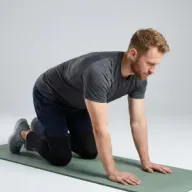
- Wrist flexion stretch. With the arm out, gently ease the hand downwards to stretch the top of the forearm. Hold around 20 seconds.
- Wrist extension stretch. Ease the hand upwards to stretch the underside of the forearm.
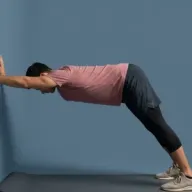
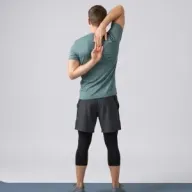
- Forearm stretch. A broader stretch through the forearm; keep it gentle and comfortable.
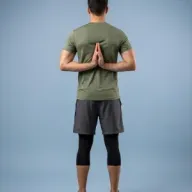
- Reverse prayer stretch. Bring the palms together behind your back, fingers pointing upwards, only as far as your shoulders and wrists comfortably allow. Skip this if the position pinches.
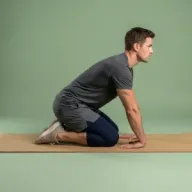
- Kneeling wrist mobility. Sitting or kneeling, keep your forearms still and circle the wrists gently in both directions without putting body weight through your hands.
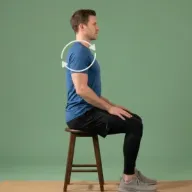
- Shoulder rolls. The forearms connect upstream, so releasing the shoulders helps the whole arm.
- Neck rotation. A gentle neck reset, since neck and arm tension often travel together.
Workload variation and regular breaks
- Break up long typing spells with short pauses - even 30 seconds of hand movement helps.
- Alternate demanding tasks with lighter ones so the hands are not loaded continuously.
- Shake out the hands and roll the shoulders between tasks.
Keyboard and mouse positioning
- Keep the wrists fairly neutral rather than sharply bent up or down while typing.
- Support the forearms where you can, and keep the mouse close so you are not reaching.
- Experiment with keyboard and mouse position; small changes can reduce strain.
Common mistakes
- Forcing the wrist stretches to a strong end range.
- Only stretching when the hands already ache.
- Ignoring numbness or tingling that keeps returning.
When symptoms may require assessment
See a GP or physiotherapist if you have persistent numbness or tingling in the fingers, hand weakness, symptoms that wake you at night, or pain that does not settle with rest and gentle movement. These can point to conditions that benefit from proper assessment.
Why typing loads the forearms
Typing and mouse work involve many small, repeated movements while the forearm muscles hold the hands steady for long periods. It is the sustained, repetitive nature of the work - rather than any single action - that tends to leave the wrists and forearms feeling tired. Gentle movement and regular breaks give those muscles a chance to change position and recover a little through the day.
Setting up to reduce strain
A few simple adjustments can ease the load. Keep the wrists fairly neutral rather than sharply angled up or down, position the keyboard and mouse so your shoulders can stay relaxed and your elbows roughly at your sides, and keep frequently used items within easy reach so you are not stretching to them. There is no universally perfect set-up, so experiment with small changes and keep what feels more comfortable.
Make regular breaks manageable
Regular short breaks are a practical way to vary the work your hands are doing. Brief, frequent pauses - shaking out the hands, rolling the shoulders, doing one or two of the stretches - break up the continuous loading that causes fatigue. Alternating demanding typing with lighter tasks has a similar effect. Persistent numbness, tingling or weakness, however, is a signal to get assessed rather than to stretch harder.
Related routines
Guided options include Wrist-Friendly Mobility, Forearm Release and the Elbow and Hand Comfort flow.
Sources
Put the guide into practice
Related Flexor routines
These guided routines are linked to the article topic. Review the difficulty and exercise list before starting.